ST96 Digital Power Display Fast-Charging Data Cable
Product Overview
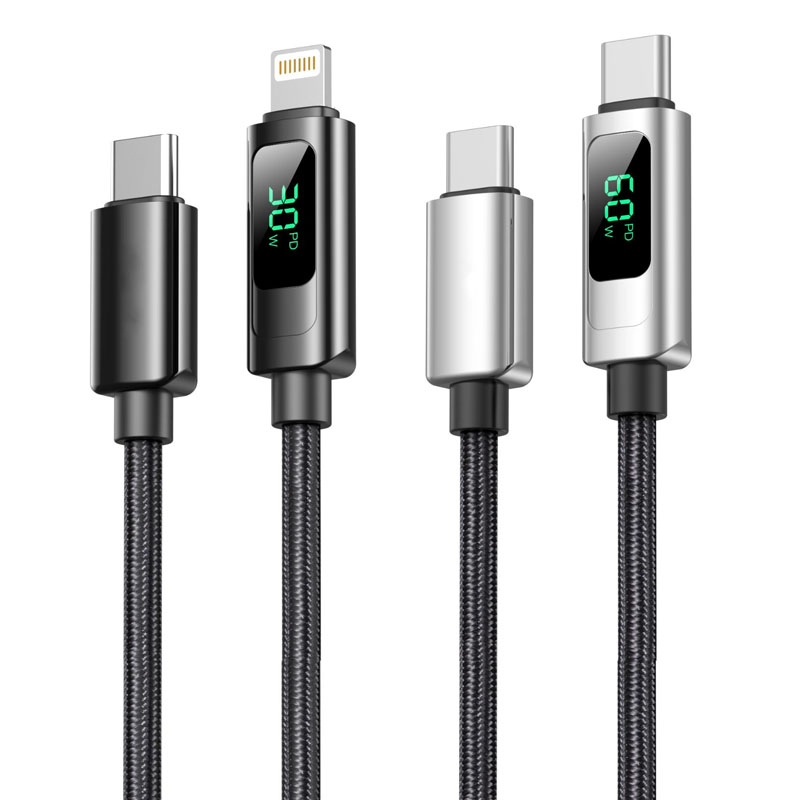
The ST96 series is an intelligent fast-charging data cable that integrates a high-precision digital power display, enabling real-time monitoring and intuitive visualization of charging power in watts (W). This provides users with a professional-level solution for charging status visibility. This series offers four connector specifications (USB to Lightning/Type-C, as well as Type-C to Type-C/Type-C to Lightning). Each connector type is available as a separate SKU; please select the corresponding model based on your device's port type.
Key Specifications
Performance Specifications
USB to Lightning Variant: Supports 5V/2.4A (up to 12W) charging and data transfer
USB to Type-C Variant: Supports 5V/4.5A (up to 22.5W) charging and data transfer
60W Type-C to Type-C Variant: Supports 20V/3A (up to 60W) PD fast charging
30W Type-C to Lightning Variant: Supports 9V/3A (up to 30W) fast charging
Full Series Functionality: All variants support simultaneous charging and data transfer
Key Selling Points
Watt-Level Digital Power Display:
Breaks through traditional solutions that only display current (A) and voltage (V), providing real-time direct reading of charging power in watts (W).
The high-definition digital screen clearly shows the current charging power, allowing users to intuitively understand the actual charging efficiency of their devices.
Intelligent Chip with Triple Monitoring:
Built-in high-precision power monitoring chip that collects real-time voltage and current data and intelligently calculates power.
Automatically recognizes device charging protocols and dynamically matches the optimal charging solution.
Continuously monitors charging status and provides automatic warnings for abnormal conditions.
Zinc Alloy Braided Durable Structure:
Multi-Protocol High-Power Compatibility:
Fully supports mainstream fast-charging protocols such as PD and QC.
Supports up to 60W high-power output, meeting the fast-charging needs of smartphones, tablets, and thin-and-light laptops.
Use Cases
Ideal for tech enthusiasts, professionals, and users who require precise monitoring of charging efficiency. Suitable for professional scenarios such as device debugging, charger performance testing, and multi-device charging management. It is a premium choice for those who prioritize charging transparency and safety.
Important Notes
The digital display function requires power to operate. Avoid prolonged exposure to high-temperature and humid environments. Display accuracy may be affected by charger and device compatibility; actual power should be verified with the device's own indicators.


 2026 New 240W Type-C Cable USB C Adapter with PD Fast Charging Pure Copper Conductor Silicone Jacket
 2026 New Stand Data Cable 240W Type C to Type C Cable with Travel Holder Adapter for Xiaomi Huawei L
 2026 NEW 240W Fast Charging Cable with Phone Stand Nylon Braided Cable USB C Type C Data Cable PD3.1
 ST-BTR002 Forming Bluetooth receiver Stable and non lagging in car Bluetooth audio cable
 ST-YP-31 L1 type L-dual 3.5mm audio TYPE-C audio head to 3.5mm charging+3.5mm audio socket
 ST-YP-103 Type-C Audio & Charging 2-in-1 Cable (Braided Short Version)
 ST-YP-101 Type-C to 3.5mm High-Elasticity Audio Cable (Zinc Alloy Spring Cable Edition)
 ST-YP-102 Lightning to Bluetooth Audio Transmitter (Braided Transparent Short Version)

 Quote within 24 hours manually
 Quote automatically by the system
 3D design and render
 Sampling within 7 days