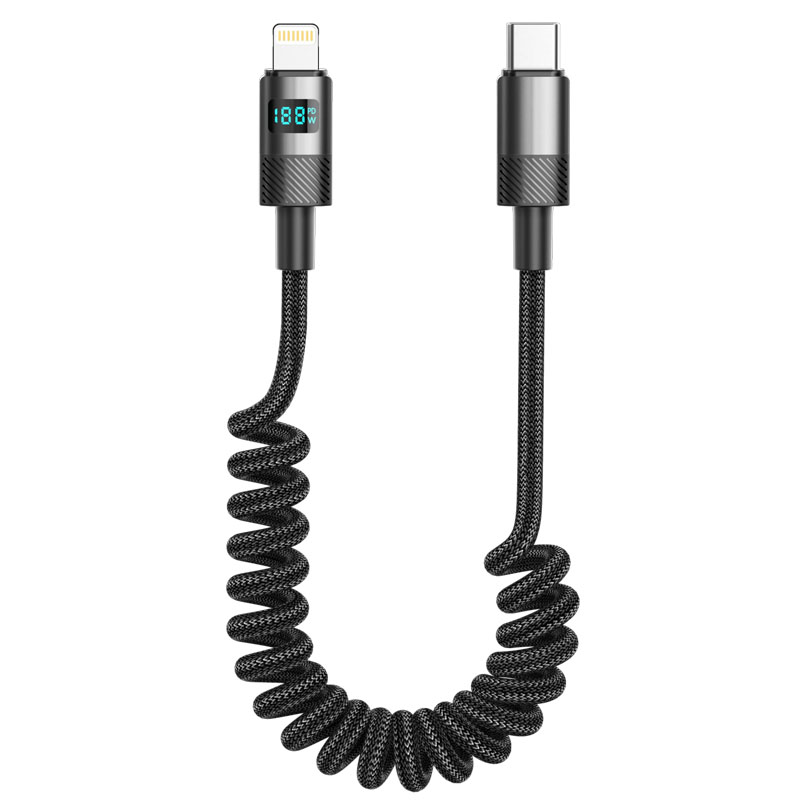
ST320 Digital Display Coiled Data Cable
Product Overview
The ST320 series is an intelligent fast-charging data cable that integrates a digital display function with a helical coil structure. Combining elastic retractable design and real-time power monitoring, it offers users a flexible, efficient, and visually informative charging experience. This series provides four independent models: USB to Lightning, USB to Type-C, Type-C to Type-C, and Type-C to Lightning. Each model is available as a separate SKU to meet the charging and data transfer needs of different devices.
Key Specifications
Length: Extends up to 1 meter / Naturally retracts to approximately 0.3 meters
Material: 48-strand braided coiled cable body + Aluminum alloy digital display housing
Color: Onyx Black
Internal Wire Structure: (55/0.08BS+250D)*2C + (16/0.08BS+250D)*3C
Performance Specifications
USB to Lightning Model: Supports 5V/2.4A (12W) charging and data transfer
USB to Type-C Model: Supports 5V/2.4A (12W) charging and data transfer
60W Type-C to Type-C Model: Supports 20V/3A (60W) PD fast charging
30W Type-C to Lightning Model: Supports 9V/3A (30W) fast charging
Full Series Functionality: All models support simultaneous charging and data transfer
Key Selling Points
Helical Coil Retractable Structure
Features a high-resilience helical coil cable body that freely extends and retracts to adapt to different usage distances, effectively preventing cable tangling.
Extends up to 1 meter in length and retracts to about 0.3 meters for easy storage and portability.
The coil structure has passed 10,000 extension-retraction cycle tests, demonstrating strong durability without deformation or slackening.
Watt-Level Power Digital Display System
Integrated high-precision electrical energy metering chip displays real-time charging power (unit: W), breaking through the limitation of traditional displays that only show current and voltage.
0.85-inch OLED screen clearly shows real-time power, voltage, and current information, with adaptive brightness to ambient light.
Supports charging protocol identification display, allowing users to intuitively understand the fast-charging standard currently in use.
48-Strand Braiding + Aluminum Alloy Reinforced Design
The outer layer of the coil body uses a tight braiding process to enhance wear resistance and tensile strength, protecting the internal coil structure.
The aluminum alloy digital display housing is precision CNC-machined, offering good heat dissipation along with drop and impact resistance.
Gold-plated connectors ensure stable signal transmission and resistance to oxidation and frequent plugging/unplugging.
Intelligent Fast Charging Compatibility
Automatically recognizes connected devices and intelligently matches mainstream fast-charging protocols such as PD3.0, QC4+, and PPS.
Fully compatible with smartphones, tablets, laptops, and various mobile devices.
Use Cases
Desktop charging scenarios: Freely extends and retracts according to device distance, keeping the workspace tidy.
In-car use: Adapts to different seat distances, avoiding cables that are too long or too short.
Mobile office and travel: Compact when retracted for easy portability.
Professional applications requiring real-time monitoring of charging status.
Technical Features
Power display accuracy: ±2%
Display type: Self-illuminating OLED
Coil extension-retraction lifespan: ≥10,000 cycles
Operating temperature: -20°C to 60°C
Maximum extension force: ≤15N
Usage and Maintenance
Apply even force when extending; avoid sudden pulling or over-extension.
Keep the display area away from sharp objects to prevent screen scratches.
Regularly clean the gaps in the coil to prevent dust buildup that may affect retraction performance.
For accurate display data and charging safety, use with certified fast-charging adapters.


 2026 New 240W Type-C Cable USB C Adapter with PD Fast Charging Pure Copper Conductor Silicone Jacket
 2026 New Stand Data Cable 240W Type C to Type C Cable with Travel Holder Adapter for Xiaomi Huawei L
 2026 NEW 240W Fast Charging Cable with Phone Stand Nylon Braided Cable USB C Type C Data Cable PD3.1
 ST-BTR002 Forming Bluetooth receiver Stable and non lagging in car Bluetooth audio cable
 ST-YP-31 L1 type L-dual 3.5mm audio TYPE-C audio head to 3.5mm charging+3.5mm audio socket
 ST-YP-103 Type-C Audio & Charging 2-in-1 Cable (Braided Short Version)
 ST-YP-101 Type-C to 3.5mm High-Elasticity Audio Cable (Zinc Alloy Spring Cable Edition)
 ST-YP-102 Lightning to Bluetooth Audio Transmitter (Braided Transparent Short Version)

 Quote within 24 hours manually
 Quote automatically by the system
 3D design and render
 Sampling within 7 days