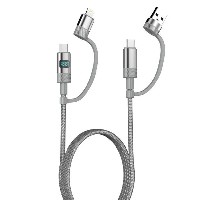
ST312 Zinc Alloy 4-in-1 Multifunction Fast Charging Data Cable
Product Overview
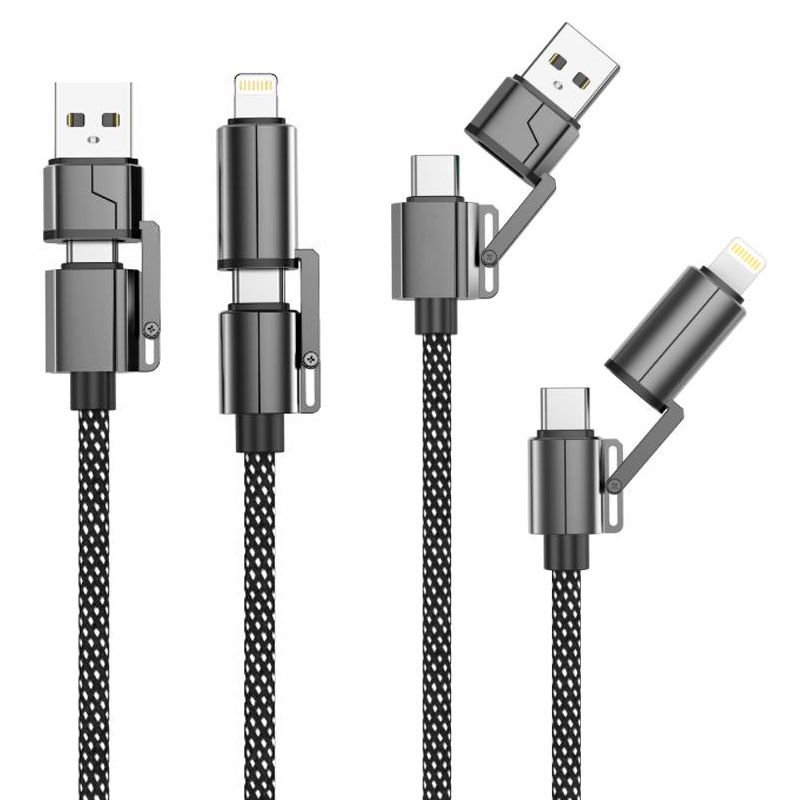
The ST312 is a revolutionary zinc alloy integrated 4-in-1 multifunction fast charging data cable. Through an innovative modular interface design, it integrates four charging solutions into a single cable body: USB-to-Lightning, USB-to-Type-C, Type-C to Type-C, and Type-C to Lightning. No need to carry adapters or switch cables—this single cable meets all your multi-device charging needs in any scenario, truly delivering the ultimate convenience of “one cable for all.”
Key Specifications
Key Selling Points
Revolutionary 4-in-1 Cable Design
Integrates four mainstream charging interfaces (USB-A to Lightning, USB-A to Type-C, Type-C to Type-C, Type-C to Lightning)
Features a zinc alloy one-piece interface module with a smart rotation/slide mechanism for easy interface switching
Solves charging needs for multiple devices—smartphones, tablets, laptops, power banks—with just one cable
Intelligent Adaptive Power System
Built-in smart recognition chip automatically matches the highest safe charging power for connected devices
Seamlessly switches from 15W standard fast charging to 60W PD high-power output
Fully compatible with mainstream digital products such as iPhone, Android devices, MacBooks, iPads, and more
Zinc Alloy Braided Durable Structure
Interfaces are crafted using high-precision zinc alloy die-casting for wear and corrosion resistance
Dense braided cable body undergoes 10,000+ bend tests for excellent tensile strength and tangle resistance
Integrated design eliminates issues like lost or damaged adapters common with traditional solutions
All-Scenario Charging Solution
Travel & Business Trips: No need to carry multiple cables or adapters—travel light
Office Desk: Powers all your devices with one cable, keeping your workspace tidy
Home Use: Meets charging needs for all family members’ devices across different brands
Use Cases
Cross-platform multi-device users (using Apple, Android, and Windows devices simultaneously)
Frequent business travelers
Digital enthusiasts pursuing a minimalist lifestyle
Households with shared charging setups
Important Notes
When using 60W PD output, please use a PD-compatible charger to ensure safety
When switching interfaces, ensure they are fully engaged for optimal contact
Avoid using the interface switching function in humid environments


 2026 New 240W Type-C Cable USB C Adapter with PD Fast Charging Pure Copper Conductor Silicone Jacket
 2026 New Stand Data Cable 240W Type C to Type C Cable with Travel Holder Adapter for Xiaomi Huawei L
 2026 NEW 240W Fast Charging Cable with Phone Stand Nylon Braided Cable USB C Type C Data Cable PD3.1
 ST-BTR002 Forming Bluetooth receiver Stable and non lagging in car Bluetooth audio cable
 ST-YP-31 L1 type L-dual 3.5mm audio TYPE-C audio head to 3.5mm charging+3.5mm audio socket
 ST-YP-103 Type-C Audio & Charging 2-in-1 Cable (Braided Short Version)
 ST-YP-101 Type-C to 3.5mm High-Elasticity Audio Cable (Zinc Alloy Spring Cable Edition)
 ST-YP-102 Lightning to Bluetooth Audio Transmitter (Braided Transparent Short Version)

 Quote within 24 hours manually
 Quote automatically by the system
 3D design and render
 Sampling within 7 days