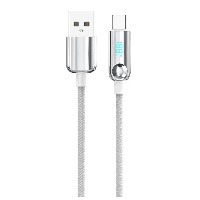
ST465 Breathing LED Color-Changing Braided Fast Charging Cable
Product Overview
The ST465 series is an intelligent fast-charging cable that combines elegant visual effects with powerful performance. Its standout feature is a built-in soft-breathing LED indicator, which emits a soothing pulsating light effect when connected for charging, making the charging status instantly recognizable and full of technological aesthetic appeal. This series offers four connector specifications (USB to Lightning/Micro/Type-C, as well as Type-C to Type-C/Type-C to Lightning). Each connector type is a separate SKU; please select the corresponding model based on your device's requirements.
Key Specifications
Performance Specifications
USB to Micro/Lightning/Type-C Variants: Support 5V/2.4A (12W) standard charging and stable data transfer.
60W Type-C to Type-C Variant: Supports PD 3.0 fast-charging protocol, delivering up to 20V/3A (60W) high-power output, compatible with high-power devices like laptops and tablets.
30W Type-C to Lightning Variant: Optimized for Apple devices, supports 9V/3A (27W) efficient fast charging.
Full Series Functionality: All variants support simultaneous charging and high-speed data transfer.
Key Selling Points
Smart Breathing LED Indicator: Features a soft pulsating light design. The breathing light automatically activates during charging, providing clear charging status indication while avoiding harsh glare, creating a technological ambiance ideal for nighttime use.
Triple-Layer Durable Construction: The 48-strand precision braiding offers excellent tensile strength and tangle resistance. The aluminum alloy housing undergoes anodizing for wear and corrosion resistance. The internal tin-plated copper cores ensure stable current transmission.
Intelligent Power Matching: Built-in smart chip automatically recognizes connected devices and matches the optimal charging power. Enables high-power 60W/30W fast charging while comprehensively ensuring device charging safety.
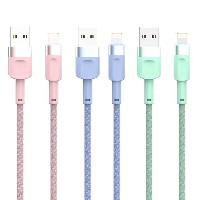
Fashionable Color Options: Available in three popular colorways. The braided texture is fine and tactile, meeting personalized aesthetic needs while maintaining the refined appearance of a professional tech product.
Use Cases
Ideal for smartphone, tablet, and laptop users who seek a blend of technological aesthetics and practicality. Particularly suitable for scenarios like nighttime charging, desktop organization, and multi-device charging management. It is the perfect choice for upgrading the quality of your digital life.


 2026 New 240W Type-C Cable USB C Adapter with PD Fast Charging Pure Copper Conductor Silicone Jacket
 2026 New Stand Data Cable 240W Type C to Type C Cable with Travel Holder Adapter for Xiaomi Huawei L
 2026 NEW 240W Fast Charging Cable with Phone Stand Nylon Braided Cable USB C Type C Data Cable PD3.1
 ST-BTR002 Forming Bluetooth receiver Stable and non lagging in car Bluetooth audio cable
 ST-YP-31 L1 type L-dual 3.5mm audio TYPE-C audio head to 3.5mm charging+3.5mm audio socket
 ST-YP-103 Type-C Audio & Charging 2-in-1 Cable (Braided Short Version)
 ST-YP-101 Type-C to 3.5mm High-Elasticity Audio Cable (Zinc Alloy Spring Cable Edition)
 ST-YP-102 Lightning to Bluetooth Audio Transmitter (Braided Transparent Short Version)

 Quote within 24 hours manually
 Quote automatically by the system
 3D design and render
 Sampling within 7 days